Pick the models
STT, LLM, and TTS are yours to choose. Swap providers without flashing firmware again.
STT Groq Whisper
Groq WhisperLLM GPT-4o mini
GPT-4o miniTTS ElevenLabs
ElevenLabsAI robotics operating system
Flash firmware from the browser, connect your own STT, LLM, and TTS keys, then talk to a desk robot that remembers and acts.
Plug in the stack you already trust
GroqOpenAIElevenLabs Anthropic
 Mem0
Mem0 Supabase
 Tuya
TuyaProduct
Bring Groq, OpenAI, ElevenLabs, and the rest. Desklet OS routes the voice turn. Keys stay in your vault — never on the robot.
STT, LLM, and TTS are yours to choose. Swap providers without flashing firmware again.
Groq WhisperGPT-4o miniElevenLabsHear → transcribe → think → speak. Every step is visible in the workspace while the robot answers.
→ SENDVOICE
API keys live in Desklet Secrets. The robot only gets a device token and its profile.
Inside Desklet OS
Not mockups. These are the screens you flash, link, and talk from — robots, models, tools, and secrets in one operating system.
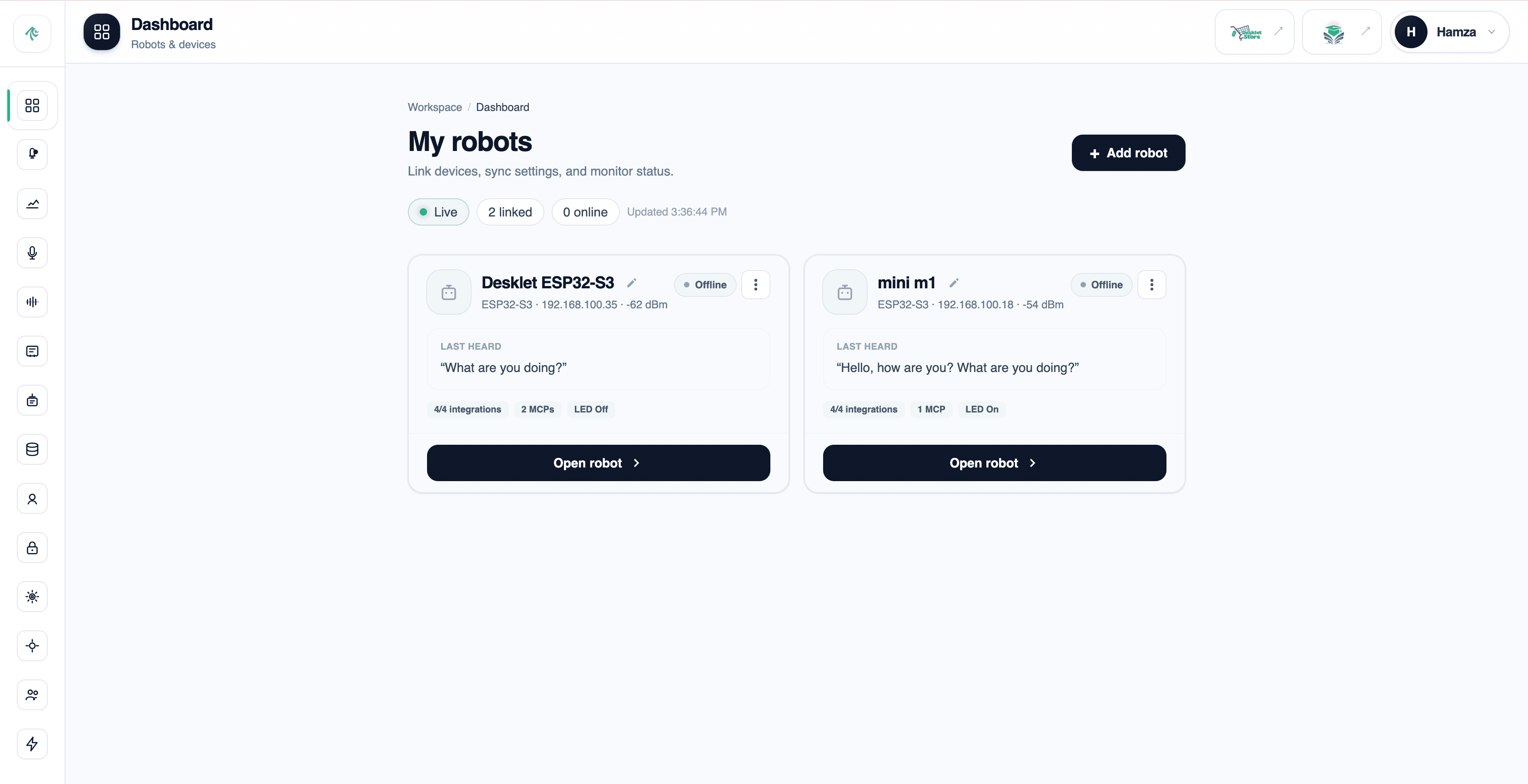
My robots
Link boards, watch status, and open a cockpit for each desk robot.
How it works
No Arduino IDE, no toolchains. Flash the ESP32-S3 from Chrome or Edge, link it with one token, and the robot pulls its whole AI profile over the air.
Web Serial from the browser. Firmware lands on the ESP32-S3 in one pass.
Pair the board to your workspace. Keys stay in the vault — the robot gets a token.
STT, LLM, TTS, memory, and tools stream in. Speak — the desk robot answers and acts.
“turn on the lamp”
Lamp is on. · plug switched
> Desklet Flash · browser USB
Mini M1
esp32-D80E…F3C
Last heard
“turn on the lamp” → Lamp is on.
GroqOpenAIElevenLabsAnthropic Google
 Meta
Meta Mistral
 DeepSeek
 Together
 Fireworks
 Qwen
Qwen Hugging Face
 NVIDIA
 Deepgram
 AssemblyAIGroqOpenAIElevenLabsAnthropicGoogleMetaMistralDeepSeekTogetherFireworksQwenHugging FaceNVIDIADeepgramAssemblyAI
 GitHub
 SlackSupabaseMem0Tuya
 Notion
 Postgres
 Docker
 Gmail
Gmail Google Drive
 Discord
 Stripe
 Sentry
 AWSGitHubSlackSupabaseMem0TuyaNotionPostgresDockerGmailGoogle DriveDiscordStripeSentryAWS
Compare
One operating system versus an open kit, DIY firmware, or a closed desk pet. Six things that actually change how you build.
Kit + OS
Rs 299–999/mo
Open kit
~$99
DIY firmware
~$10–20
Closed pet
~$279
Pricing
Pay monthly via JazzCash, EasyPaisa, or NayaPay. Bring your own AI keys — you only pay Desklet for the OS.
Explore Desklet OS
Free
Start with one Desklet
Rs 299/month
Build & automate more
Rs 699/month
Full fleet control
Rs 999/month
FAQ
Hardware, keys, payments, and plans — the basics before you flash.
Desklet OS is the operating system for desk robots. Flash firmware from your browser, connect your own STT, LLM, TTS, memory, and tools, then talk to your robot with one workspace.
A Desklet D1 / ESP32-S3 voice kit with mic, speaker amp, and OLED. Flash over USB from Chrome or Edge — no Arduino IDE required.
In Desklet Secrets (your workspace vault). Robots pull config with a device token; keys stay in your workspace and are never baked into firmware.
Plans are priced in PKR. Pay monthly via JazzCash, EasyPaisa, or NayaPay, then submit a screenshot for manual upgrade approval.
Basic includes 1 robot, Builder 3, and Pro 5. Upgrade anytime from Billing when your fleet grows.
Yes. Wire Groq, OpenAI, Anthropic, ElevenLabs, Mem0, and more with your own keys. Desklet OS orchestrates the turn — you keep control of the stack.
Ready
Create a free workspace, flash your robot from the browser, and hear it answer back.